
For files, see “Send, Modify, and Resend Files” on page 257.
To modify or resend a document
|
1
|
|
2
|
In the Document Sendbox list, click the check box for the document to modify or resend.
|
|
3
|
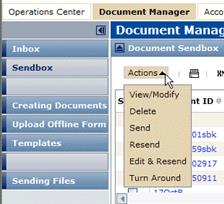
To resend a document with a Sent status to the Trading Partner, at the top of the list, click Actions > Resend. Trading Grid immediately submits the document for sending.To view and/or modify a document with a Saved status, or to modify a document with a Sent status and then resend it, click Actions > View/Modify or click Actions > Edit & Resend, respectively.
 |

|
To resend a document with a Sent status to the Trading Partner, click Actions > Resend. The document displays in your Document Sendbox with a Resent status.
|
|
|
To send the document for the first time, at the top of the form, click Send. The document displays in your Document Sendbox with a Sent status.
|
|
|
To save the form send or resend it later, at the top of the form, click Save. The document displays in your Document Sendbox with a Saved status.
|
 Trading Grid Online User Guide PDF
