Search for Invoices by Time Frame

To search for invoices within a Specific Number Of Days
|
1
|
On the Active Documents Search page, select Specific No. Of Days from the Time Frame drop-down menu.
|
|
2
|
Specify the range for the number of recent days for the search in the Last “X” No. Of Days, To: and From: fields.
|
For example, search from 5 days ago to 3 days ago.

For example, beginning at 00:00:00 the first day and ending at 11:59:59 on the last day.
|
4
|
Click Search.
|
To search by Specific Date Range
|
1
|
On the Active Documents Search page, select Specific Date Range from the Time Frame drop-down menu.
|

The default is the time period for the previous 36 hours.
|
3
|
Click Search.
|
To search by Relative Time Range
|
1
|
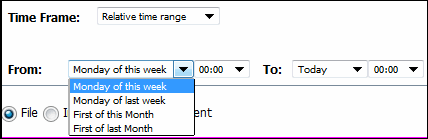
On the Active Documents Search page, select Relative Time Range from the Time Frame drop-down menu.
|
|
a
|
Select one of the following options from the From: drop-down menu.
|

|
b
|
Select one of the following options from the To: drop-down menu.
|
|
3
|
Click Search.
|
 Trading Grid Online User Guide PDF
