To change the column settings on the Search Results page
|
1
|
Click Settings.
|

|
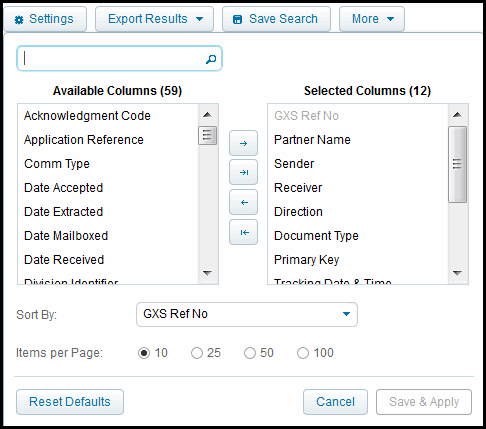
Scroll or use the text box above the Available Columns list to find a column you want to add.
|
|
|
To change the order of columns displayed, in the Selected Columns box, click the column name and drag it to a different position in the list.
|
|
|
To change the default sort, select a new column from the Sort By dropdown. To change the sort sequence of the current listing only, click on a column heading. For a reverse sort, click the column heading again.
|
|
|
Specify the number of items to display per page by checking an Items per Page option.
|
|
|
To restore the default settings, click Reset Defaults,
|
|
2
|
Click the Save & Apply. These settings are saved until the next time you modify the settings.
|
 Trading Grid Online User Guide PDF
