Reports for Trading Grid Messaging Service : TGMS Reports : Transaction Summary Report

Transaction Summary Report

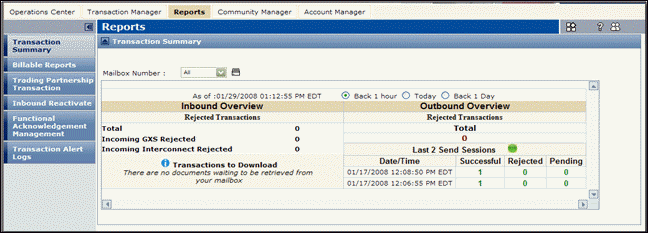
The Transaction Summary provides an up-to-date, snapshot of sent and received data. Trading Grid displays the information in real-time. Real-time means each time you send or receive a document, it is instantly reflected in the Transaction Summary report.

For sent and received documents, view the following information for the selected time period. You can select on one of these time periods.

*
Back 1 Hour — From one hour earlier until the current time.
*
Today — From 12 a.m. of the current day until the current time.
*
Back 1 Day — From 12 a.m. of the previous day until the current time.
*
Incoming Interconnect Rejected — Number of documents sent from a Third Party network.
*
Incoming OpenText Rejected — Number of documents sent from the OpenText network that OpenText refused.
*
Transactions to Download — Number of documents in your mailbox that you have not downloaded yet.
*
Rejected transactions — Number of documents OpenText rejected and did not send.
*
Last 2 Send Sessions — Date/Time of the most and next-most recent send session. For each session, displays the number of documents
*
That were Successfully sent.
*
That OpenText refused to send (Rejected) due to errors.
*
In a “holding area” (Pending) waiting for OpenText to send.

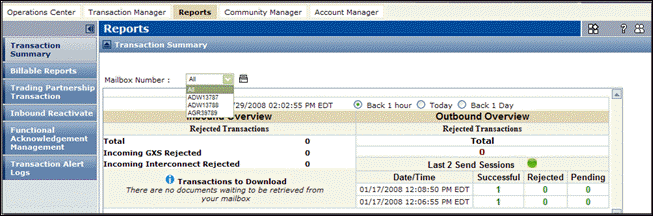
View transactions by selecting one or All mailboxes.

16.2 release. Updated October 23, 2016


Trading Grid Online User Guide PDF


Copyright © 2016 Open Text. All rights reserved.
Trademarks owned by Open Text.