You can configure the page display of the Document Manager Inboxes and Sendboxes to:

To configure an Inbox or Sendbox list
|
1
|
Click the Document Manager tab.
|
 in the Document Manager title bar.
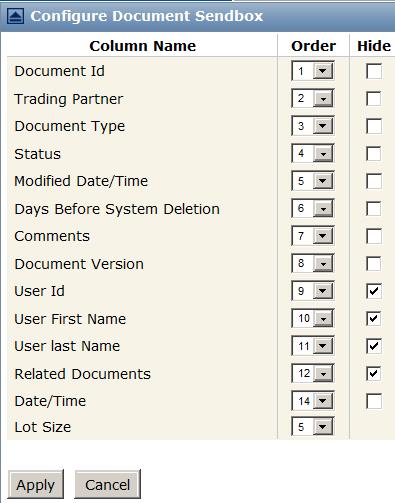
The Configure Document dialog box lists the Inbox or Sendbox columns that are the configurable.
|
Click the arrow in the Order column, and select a value for a column. For example, the value of 3 places a column as the third column on the page.
|
|
|
Check or uncheck the Hide check box for the columns you want to show or hide.
|
|
|
Select a Lot Size value.
|
|
|
Check the appropriate check box in the Copy to Ops Center dialog box.
|
 Trading Grid Online User Guide PDF
