Document Sendbox Statuses
The Status column in the Document Sendbox shows the current state of sent documents. Items in your Document Sendbox can be one of the following statuses.

|
Saved - A document has been created or updated and saved, but not been sent. You must now open the item to send it.
|
|
|
Packing - An Advanced shipping notice (ASN) is in process of being packed.
|
|
|
Packed - ASN has been packed. To send an unopened document, check the check box. Then, click Actions > Send.
|
|
|
Submitted - Sending a document for the first time submits it to Trading Grid Online, which then checks for errors.
|
|
|
Sent - A document was delivered to the receiver successfully.
|
|
|
Failed - Trading Grid Online could not send the document due to errors.
|

|
Click the Failed status link to view the errors.
|
|
|
Resent - A document was resent successfully.
|
|
|
Resubmitted - Re-sending a document due to errors, updates, etc., submits it to Trading Grid Online, which then checks for errors.
|
|
|
Validated - The document form is saved and ready to send.
|
|
|
To send it unopened, check the check box name, and click Actions > Send.
|
|
|
Translation - (For translation subscriptions.) The document is in the translation process.
|
|
|
Translation Complete — The translation completed successfully.
|
|
|
Translation Error — An error prevented the translation from completing successfully. For example, empty mandatory fields, non-numeric data in a numeric field, or missing segments cause a translation to fail.
|
|
|
Translation Failed — An error prevented the translation. For example, the sender and receiver addresses do not match a profile in the system, so the translator cannot call a map.
|
|
|
Send Failed — The document was not sent due to an error.
|
|
|
Acknowledged — The buyer sent an acknowledgement file (for example, 997 or CONTRL) in response to receiving the document.
|
|
|
Delivered — The document was delivered successfully.
|
|
|
Redelivered — The document was redelivered successfully.
|
To view the status of a document in your sendbox
|
1
|
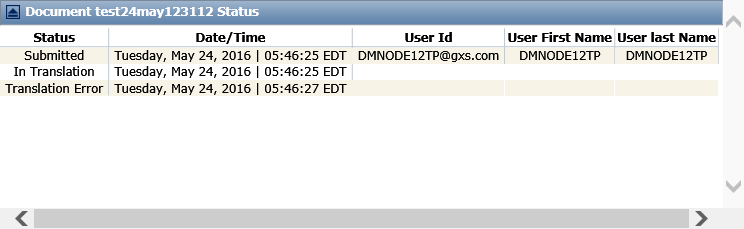
Click the link in the Status column for the file you want to open.
|
The Document Status page opens.
 Trading Grid Online User Guide PDF
