Document Inbox Statuses
The Status column in the Document Inbox shows the current state of a document, based on four status levels:

|
New - The document has not been opened yet.
|
|
|
Read - The document was opened.
|
|
|
Downloaded - The document contents were downloaded to your desktop.
|
|
|
Turned Around - A new document was created based on the current document. For example, if an Invoice turned around from an Order, a status history indicates the Document ID, turnaround type, and creation date and time.
|
To view the status of documents in your inbox
|
1
|
Click the link in the Status column for the document.
|

The Document Status page opens.
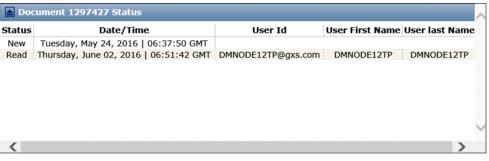
The Document Status page provides the following information about items in your inbox.

 Trading Grid Online User Guide PDF
