Active Invoices with Compliance : Search for Invoices Using Active Invoices : Tax Exemption Justification Documents

Tax Exemption Justification Documents
Important: This topics applies, and its functions might be required, if you have Trading Partners that send or receive Non-Signed EDI Invoices.

If your Company has a document that justifies VAT exemption, you can upload it into the Archive. After you upload a tax exemption justification document, it applies to all subsequent invoices that are sent and received within the Legal Entity that you specify. This means that

*
*

For example:

In this example:

*
*
*
*

To upload a tax exemption document

Important: The tax exemption document must be in PDF format and cannot be larger than 4MB.
1
In the Reports Tab, select Active Invoices from the Navigation Panel.
2
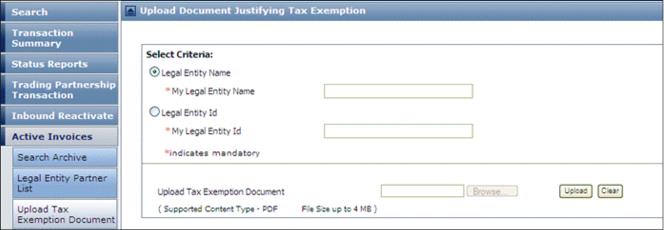
Click Upload Tax Exemption Document.

The Upload Document Justifying Tax Exemption page opens.
3
For My Legal Entity Name or My Legal Entity ID, enter the applicable name or ID of the entity associated with the Trading Partner(s) and the invoices this document applies to.
Important: You cannot upload a document until you enter a valid Name or ID. If you do not know the exact Name or ID contact your Company Administrator.
4
For Upload Tax Exemption Document, click Browse to find your document or enter the path and filename.
5
Click Upload.

16.2 release. Updated October 23, 2016


Trading Grid Online User Guide PDF


Copyright © 2016 Open Text. All rights reserved.
Trademarks owned by Open Text.
