Active Invoices with Compliance : Search for Invoices Using Active Invoices : Legal Entity Partner List

Legal Entity Partner List
Important: This topic applies, and its functions might be required, if you have Trading Partners that send or receive Non-Signed EDI Invoices.

Every Company that sends or receives Non-Signed EDI Invoices must maintain a file of Trading Partners with whom the invoices are exchanged to log and track Trading Partner changes. AIC provides a search function that lets you quickly find an associated Trading Partner's legal entity profile to see if, for example, contact information has changed or if the Trading Partner E-Invoicing agreement has terminated.

Note: A Legal Entity is the record of the unique Buyer or Supplier party, typically from a tax registration perspective, that exchange compliant invoices through AIC. This is a company or a business unit or division within a company. For example, Company ABC might operate in three European countries and might be registered as a unique entity with the tax offices of each of those three countries. Therefore, Company ABC has three corresponding legal entities configured within AIC.

To see a Trading Partner(s) associated to a specific Legal Entity or Legal ID

1
2
On the left side, click Active Invoices > Active Invoices > Legal Entity Partner List.

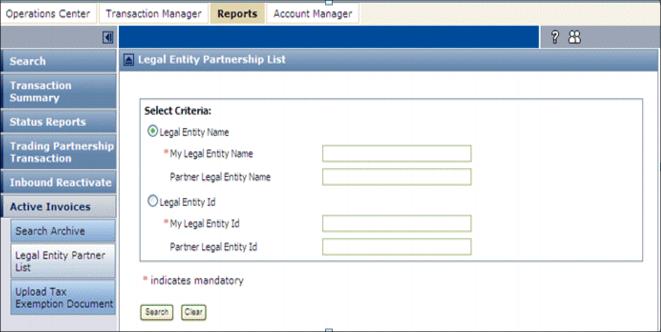
The Legal Entity Partnership List page opens.
3
For My Legal Entity Name or My Legal Entity ID, enter a valid name or ID of the entity that trades with the Partner(s).
Note: A a valid Name or ID must be entered. If you do not know the exact Name or ID, contact your Company Administrator.
4
5
Click Search.

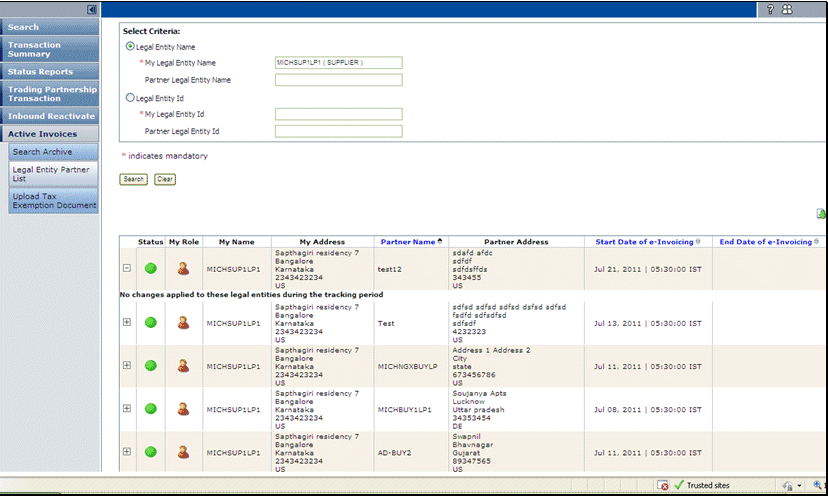
The page redisplays listing the Trading Partners associated to your Company's Legal Entity Name or ID that you specified.

From this page you can do the following:

See also:

*
*
*
*

16.2 release. Updated October 23, 2016


Trading Grid Online User Guide PDF


Copyright © 2016 Open Text. All rights reserved.
Trademarks owned by Open Text.