View Report Schedules
From the Scheduled Reports page, you can also do the following:

To view scheduled reports
|
1
|
Click the Reports tab in Trading Grid Online.
|
|
2
|
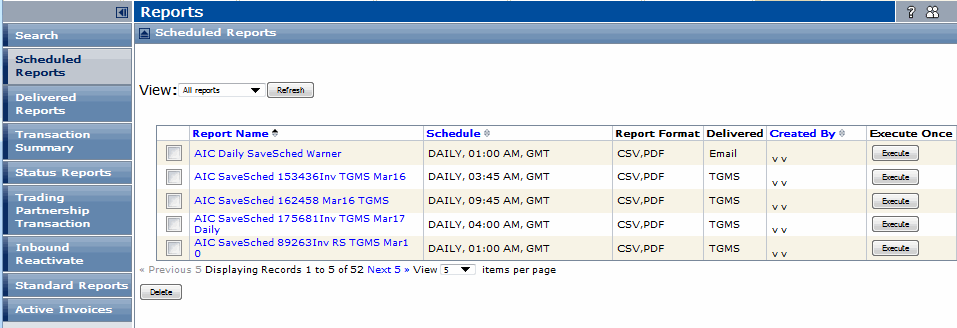
Click Scheduled Reports.
|
The Scheduled Reports page opens.
|
3
|
Click the name of the report in the Report Name column to view the schedule.
|
To run a one-time report immediately
|
1
|
Click the Reports tab in Trading Grid Online.
|
|
2
|
Click Scheduled Reports.
|
The Scheduled Reports page opens.
|
4
|
Click Execute for the report.
|
The system adds a one-time report to the Scheduled Reports list with the same name, along with ONCE and the current date and time.
To change a report schedule
|
1
|
Click the Reports tab in Trading Grid Online.
|
|
2
|
Click Scheduled Reports.
|
The Scheduled Reports page opens.
|
3
|
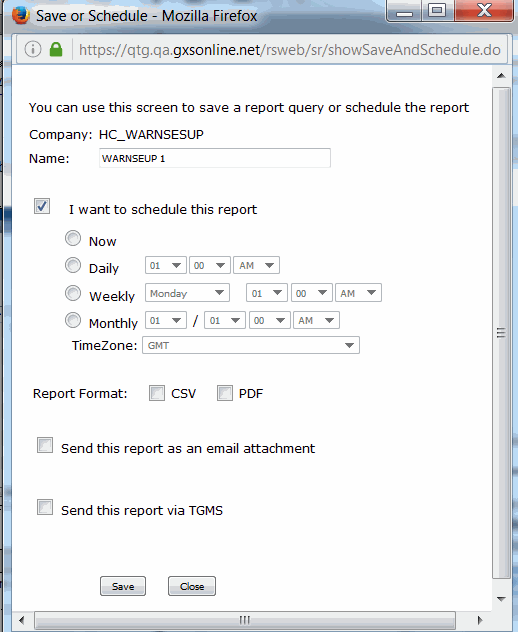
Click the name of the report in the Report Name column.
|
The Save or Schedule page opens.
|
5
|
Click Save.
|
To delete a scheduled report
|
1
|
Click the Reports tab in Trading Grid Online.
|
|
2
|
Click Scheduled Reports.
|
The Scheduled Reports page opens.
|
3
|
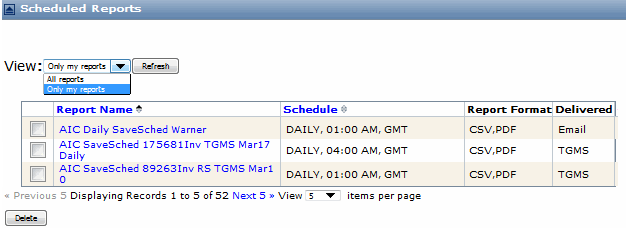
Click Only my reports from the View drop-down menu.
|
|
5
|
Click Delete.
|
 Trading Grid Online User Guide PDF
