Schedule Reports
To set up a report schedule
|
1
|
In the Search Results page, click Save/Schedule Report.
|
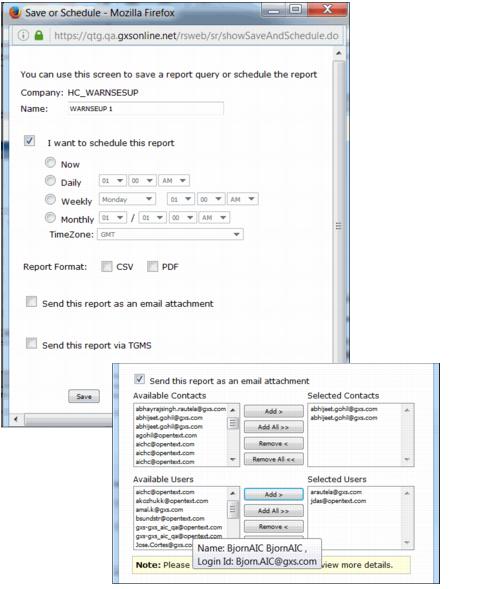
The Save or Schedule page displays the name of the company for the report.
|
2
|
Type a name for the report in the Name field.
|
|
3
|
Click the checkbox, I want to schedule this report, and select the time frame and time zone for the scheduled report.
|
|
4
|
Click the checkbox for the report format, either CSV or PDF.
|
|
5
|
To email the report, click the checkbox, Send this report as an email attachment. Specifiy the email addresses of the users and contacts to receive the report.
|
Note: You can only add contacts and users that have access to the report folder, listed as available.
|
6
|
Yo send the file to a Trading Partner through Trading Grid Message Services (TGMS), click the Send this report via TGMS checkbox.
|
|
7
|
Click Save.
|
The system adds the schedule to the Scheduled Reports list and displays a confirmation message.
To view the scheduled report, click Scheduled Reports in the Reports tab. See “View Report Schedules” on page 126.
 Trading Grid Online User Guide PDF
