To define service contacts
|
1
|

|
A list of alerts the person is contacted about (Contact Type column).
|
|
|
If the person is a Default contact. Trading Grid Online automatically designates the Technical Contact entered in the Company Profile as the default contact. You can change the default contact (see “Re-Assign a Default Contact” on page 347).
|
|
|
If the person is currently active (In-Use column).
|
|
2
|
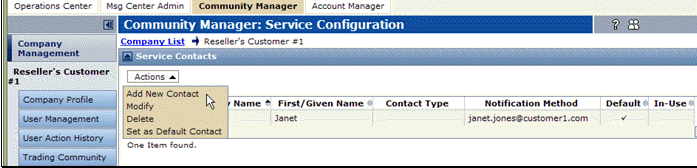
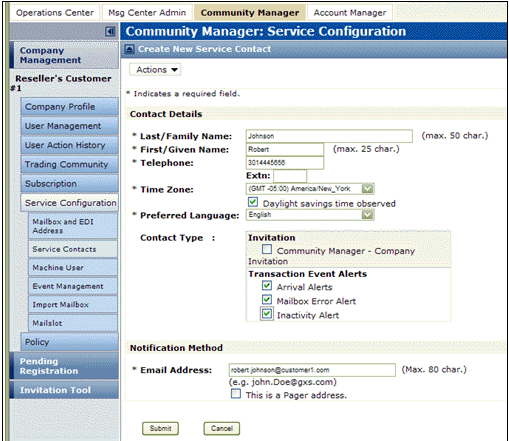
The Create New Contact Service page opens.
|
4
|
Optionally, select the Contact Type(s), or which contacts should receive notification(s) in addition to service messages and outages.
|
|
|
For Intelligent Web Forms (IWF) Users:
|
|
|
Invitation — Contact receives subsequent invitations, such as invites for the company to connect to an additional IWF hub sponsoring new forms. IWFS customer only.
|
|
|
Incoming Document Alert — ”Whenever a new document arrives in your Document Inbox” rule.
|
|
|
Incoming File Alert — ”Whenever a new file arrives in your File Inbox” rule.
|
|
|
For Trading Grid Online Messaging Service Users:
|
|
|
Arrival Alerts — ”Whenever a document interchange arrives in your mailbox” rule.
|
|
|
FA Delinquency — ”Whenever a trading partner has a delinquent FA” rule.
|
|
|
Inactivity Alert — ”Whenever a mailbox is inactive” rule.
|
|
|
Mailbox Error Alert — ”Whenever a mailbox processing error occurs on an outbound interchange” rule.
|
Note: When you select an option for a customer contact, Trading Grid Online automatically adds the contact to the notification list for alerts you create later. For example, if you subscribe to and select Arrival Alert for this contact, and define a rule to generate an alert when a partner has one or more documents that need acknowledgment, Trading Grid Online automatically notifies this contact. If you later delete the contact, Trading Grid Online automatically deletes the contact from the Arrival notification list.
|
5
|
Enter the Email Address for the contact. If the address is for a pager, select This is a Pager address.
|
|
6
|
Click Submit.
|
The Service Contact Request Complete page opens.
|
7
|
Click the Return to Service Contacts List link.
|
The new contact displays in the list on the Service Contact page. 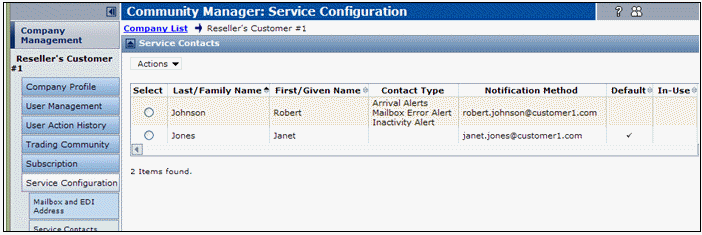
 Trading Grid Online User Guide PDF
